If you are building with Supabase, you are using JWTs for auth. They show up in your cookies, your authorization headers, your RLS policies. But most people have a pretty fuzzy mental model of what is actually happening under the hood. In this blog we will walk through all of it.
Signing is not encryption
Before anything else, this distinction needs to be clear because it trips a lot of people up.
Encryption scrambles data so nobody can read it without a key. Signing leaves the data completely readable but attaches a tamper-proof seal. JWTs use signing, not encryption.
You can decode the payload of any JWT right now without any key at all:
echo “eyJzdWIiOiIxMjM0NTY3ODkwIiwibmFtZSI6IkpvaG4gRG9lIiwiYWRtaW4iOnRydWUsImlhdCI6MTUxNjIzOTAyMn0” | base64 --decode
# {“sub”:“1234567890”,“name”:“John Doe”,“admin”,“iat”}
The payload is not a secret. What the signature protects is the integrity of that payload. It lets your server say “this was created by whoever holds the signing key, and nothing has been changed since.” That is what you are verifying on every authenticated request.
If you actually need confidential claims in a JWT, you want JWE (JSON Web Encryption). That is a different standard entirely, and Supabase does not use it by default.
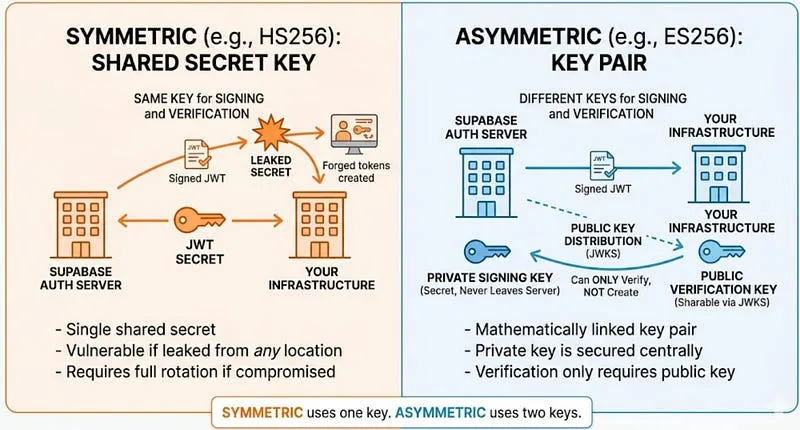
The symmetric approach: HS256
HS256 stands for HMAC using SHA-256.
SHA-256 is a hash function. Feed it any input, you get back a fixed 256-bit fingerprint. Same input always produces the same output, and you cannot reverse it. HMAC takes SHA-256 and mixes in a secret key, so the signature is essentially HMAC-SHA256(secret, header + "." + payload).
To verify a JWT, the server recomputes that value using its own copy of the secret and checks whether it matches the signature in the token. Match means the token is valid. No match means 401.
This is called symmetric because the same key does both jobs. Creating a signature requires the secret. Verifying one also requires the secret. Both sides have to hold the exact same key.
In a Supabase project, this means you copy the JWT secret from your dashboard and paste it into your environment. Now it lives in at least two places: Supabase’s auth server and your own infrastructure. Every service that needs to verify tokens needs a copy.
This works, and a lot of production apps run on it just fine. But the failure mode is worth thinking about. If that secret leaks:
- An attacker can forge JWTs for any user, including ones that do not exist
- They can craft tokens with
role: service_roleand bypass all your row-level security - You have to rotate the secret immediately, which means updating every environment that has a copy and invalidating every active user session at the same time
Symmetric is not inherently insecure. The issue is that the more places the secret lives, the more surface area you have to defend. And when it fails, it fails completely.
The asymmetric approach: ES256
ES256 uses elliptic curve cryptography instead of a shared secret. Rather than one key that both sides hold, you have two mathematically linked keys.
The private key lives on Supabase’s auth server. It never leaves. You cannot download it, and you never see it as a developer. It is used to create signatures.
The public key is meant to be shared. It can only verify signatures, not create them. The math linking the two keys makes this strictly one-directional: having the public key gives you no ability to produce a valid signature.
This is the meaningful shift from HS256. In the symmetric model, anything that can verify a token holds enough information to forge one. In the asymmetric model, verification and signing are decoupled. Your server can verify tokens without touching anything that could be used to mint a fake one.
Supabase uses ES256 specifically, which is elliptic curve DSA on the P-256 curve. Compared to RSA, elliptic curve gives you equivalent security with smaller keys and faster operations. That matters because JWT verification is happening on every single authenticated request.
One thing worth knowing: Supabase historically defaulted to HS256 and added asymmetric JWT support more recently. Which algorithm your project uses depends on when it was created and your project settings. Check your dashboard if you are not sure.
Since anyone doing verification needs the public key, Supabase exposes it at a standard endpoint called a JWKS (JSON Web Key Set):
https://your-project.supabase.co/auth/v1/.well-known/jwks.json
The response is a JSON object containing an array of public keys. Each entry looks something like this:
{
“kty”: “EC”,
“crv”: “P-256”,
“x”: “…”,
“y”: “…”,
“kid”: “abc123”,
“alg”: “ES256”
}
kty and crv tell you it is an elliptic curve key on the P-256 curve. x and y are the actual public key coordinates. kid is a short identifier for this specific key.
Every JWT Supabase issues includes a kid field in its header (the first segment, not the payload):
{ “alg”: “ES256”, “typ”: “JWT”, “kid”: “abc123” }
Verification works like this: read the kid from the header, find the matching key in the JWKS, verify the signature using that key. If the kid is not in your cache, refetch the JWKS endpoint. This is also how key rotation works without breaking existing tokens. If the key still is not there after a refetch, the token is invalid.
Who actually does the verifying
This is something that confuses people coming from HS256.
In the HS256 world, verification can happen on Supabase’s servers because they hold the shared secret. In the ES256 world, you verify tokens yourself using the public key. That is kind of the whole point of going asymmetric.
Your server fetches the JWKS on startup, caches the public keys in memory, and on every authenticated request it reads the kid from the incoming JWT, looks up the right key, and runs the ES256 verification locally. No round-trip to Supabase, just math. The only time it hits the JWKS endpoint again is when a key rotates and a kid shows up that is not in the cache yet.
The upside is that even if someone somehow got your public key, they gain nothing. The only thing that could let someone forge tokens is the private key, which never left Supabase’s auth server.
Key takeaways
- JWTs are signed, not encrypted. The payload is readable by anyone. Do not put secrets in it.
- HS256 uses one shared secret for both signing and verification. Any party that can verify a token holds enough information to forge one, and a leaked secret means rotating everything immediately.
- ES256 splits signing and verification into separate keys. Your application only ever holds the public key, which cannot be used to forge tokens.
- JWKS is how public keys get distributed. Your server fetches and caches the JWKS, and verification happens locally on every request.
- In the asymmetric model, you are doing the JWT verification yourself, not Supabase.
- Check which algorithm your project is actually using. The default has changed over time, and older projects may still be on HS256.