Production was broken for our app Rezzy. Database calls were failing under load, and we had no idea why.
The errors weren’t constant. Light traffic was fine. But once requests stacked up, things started falling apart at the database layer. Queries that had run thousands of times without issue were suddenly throwing errors. We kept looking at our code. Nothing had changed.
That’s the worst kind of bug. The kind where you’re staring at code that looks correct, in an environment that worked yesterday, and the logs are pointing at something you don’t fully understand yet.
What We’re Working With
Rezzy runs on Google Cloud Run. If you haven’t used it, Cloud Run is Google’s managed container platform. It auto-scales based on traffic, which is great for a product with spiky load. More requests come in, more instances spin up. Things quiet down, instances scale back.
The database side of that story gets complicated fast. Every Cloud Run instance maintains its own pool of connections to Postgres. As instances multiply under load, so do connections. Postgres isn’t designed to handle that at scale. Each connection is a process on the server. Memory, file descriptors, overhead. The database starts struggling well before you run out of application capacity.
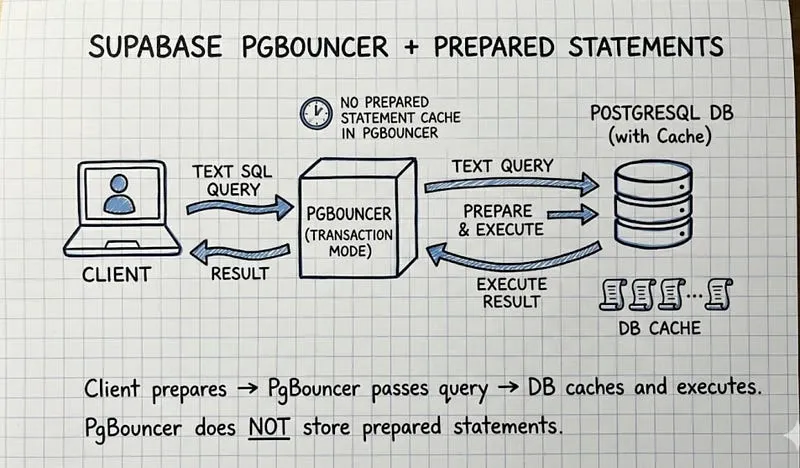
So we connect through Supabase’s transaction pooler URL, which runs PgBouncer under the hood. PgBouncer sits between your app and Postgres, maintaining a small fixed set of real connections and handing them out as needed. We run it in transaction pooling mode, which means a client only holds a real Postgres connection for the duration of a single transaction. The moment that transaction commits, the connection goes back in the pool for someone else to use.
This is an extremely efficient setup. Ten thousand clients can share twenty Postgres connections. For Cloud Run, it’s the right call.
It’s also what made the bug so hard to find.
Our ORM is SQLModel, which sits on top of SQLAlchemy and uses psycopg3 as the actual Postgres driver. That chain matters. Each layer has its own behavior, and one of them was working against us without us knowing.
How a Query Actually Travels to Postgres
Before getting into what broke, it helps to understand the full journey a query takes. Most engineers have a rough mental model of this, but the details matter here.
When your code calls something like session.execute(query), here’s the real sequence:
Your ORM hands the SQL string down to psycopg3. psycopg3 either opens a network connection to the database or grabs an existing one from its pool. It then sends the query over that connection using Postgres’s wire protocol. Postgres receives the bytes, parses the SQL into a syntax tree, figures out an execution plan (which indexes to scan, how to order joins, etc.), and runs it. Results come back over the wire and get decoded into Python objects.
That parse and plan step happens every single time. For a query that runs hundreds of times per second, Postgres is doing the same work over and over on the same SQL string.
Prepared statements exist to short-circuit that. You send Postgres a query once, it parses and plans it, caches the result under a name, and from then on you just send the name plus parameter values. Postgres skips straight to execution.
In raw SQL it looks like this:
PREPARE my_query (int) AS SELECT CAST($1 AS INTEGER);
EXECUTE my_query(1);
EXECUTE my_query(2);
EXECUTE my_query(3);
DEALLOCATE my_query;
Good optimization. Less repeated work. Faster queries at volume.
Here’s the thing: psycopg3 does this automatically. You don’t write any of that PREPARE code yourself. The driver watches how many times a query runs on a connection, and after 5 executions it prepares the statement silently, in the background. The next execution and every one after that uses the cached plan.
That threshold is controlled by a setting called prepare_threshold. The default is 5. Most people never touch it. We hadn’t.
Why This Explodes With Transaction Pooling
Prepared statements are connection-local. When psycopg3 sends PREPARE _pg3_0 AS ... on connection A, that statement lives only on connection A, in the memory of that specific Postgres backend process. Connection B has never heard of it.
In session pooling mode, this doesn’t matter. Your client holds the same Postgres connection for its entire session, so prepared statements accumulate and stay available.
In transaction pooling mode, your connection changes after every transaction. PgBouncer is actively shuffling real Postgres connections between clients to maximize utilization. You might get connection A for one transaction and connection C for the next.
Here’s the exact sequence that was killing us:
Transaction 1 borrows Postgres connection A from the pool. psycopg3 runs the query. It’s the 5th execution, so the driver automatically prepares it: PREPARE _pg3_0 AS .... Transaction commits. Connection A goes back into the pool.
Some other client picks up connection A. Does their thing. Returns it.
Transaction 2 starts. It borrows connection B. psycopg3 still has _pg3_0 in its local cache and sends EXECUTE _pg3_0 to connection B. Connection B has never seen _pg3_0. Postgres throws an error.
There’s a second failure mode that’s even more confusing. Two different clients can race to prepare the same statement name on the same connection:
Transaction 1 from client 1 borrows connection A. psycopg3 prepares _pg3_0. Returns connection A to the pool. Transaction 1 from client 2 then picks up connection A. Its psycopg3 instance also decides it’s time to prepare its first query, also naming it _pg3_0. Postgres responds: “a prepared statement called _pg3_0 already exists.” That’s the DuplicatePreparedStatementError.
Both failure modes have the same root cause: the driver tracks prepared statement state on a connection it doesn’t actually own persistently. From psycopg3’s perspective, it has a connection and a cache. It has no visibility into PgBouncer shuffling that connection to a dozen other clients between transactions.
Under light traffic, you rarely hit this. The pool might consistently hand you the same connection by chance. Under real load, with concurrent requests and PgBouncer actively multiplexing, the collision rate climbs and the errors stack up fast. Which is exactly what we saw. Fine in development, fine under low traffic, broken in production under load.
Verifying It
Before touching anything in production, we wanted to confirm what was actually happening. We wrote a small script that runs the same query 10 times on one connection, then queries pg_prepared_statements directly to see if psycopg3 had prepared anything:
import asyncio
from sqlalchemy import text
from src.database.postgres.postgres_client import PostgresClient
async def main() -> None:
client = PostgresClient()
try:
async with client.engine.connect() as conn:
for _ in range(10):
await conn.execute(
text(“SELECT CAST( AS INTEGER)”),
{“value”: 1},
)
result = await conn.execute(
text(
“”“
SELECT name, statement
FROM pg_prepared_statements
WHERE name LIKE ‘pg3%’
ORDER BY name
“”“
)
)
rows = result.fetchall()
print(f“Prepared statements found: {len(rows)}“)
for name, statement in rows:
print(f”{name}: {statement}“)
assert not rows, “psycopg prepared statements are still being created”
finally:
await client.engine.dispose()
if name == “main”:
asyncio.run(main())
Running this before the fix: prepared statements showing up in the results, _pg3_0 and friends, exactly as expected. The driver was preparing statements we never asked it to prepare.
The Fix
One line in the engine configuration:
return create_async_engine(
self.database_url,
connect_args={
“prepare_threshold”: None
},
)
Setting prepare_threshold to None tells psycopg3 to never automatically prepare any statement. Every query goes out as full SQL every time. The driver stays stateless across connection boundaries, which is exactly what you need when those boundaries are being managed by a pooler.
Run the verification script again after the fix: zero prepared statements. The assert passes.
We deployed it. The errors stopped.
What You’re Giving Up
Disabling prepared statements isn’t free. You lose the parse and plan cache, so Postgres does that work on every query. For most web application queries, this overhead is small relative to actual execution time and network latency. Postgres’s planner is fast. The tradeoff is worth it.
There is an alternative path. PgBouncer 1.21 added experimental support for proxying prepared statements in transaction mode, so the pooler itself intercepts and manages them on behalf of clients. It works in some setups, but there are still edge cases around DEALLOCATE behavior with psycopg3 that can bite you. Disabling auto-preparation is the simpler and more reliable fix if you’re on transaction pooling.
The other option is switching to session pooling mode, which gives each client a persistent Postgres connection and makes prepared statements work correctly. The cost is that session mode is far less efficient for connection multiplexing. Depending on your traffic patterns and connection budget, that may or may not be acceptable.
Key Takeaways
- psycopg3 prepares statements automatically after 5 executions by default. This is an optimization, but it assumes the driver has a persistent connection underneath it.
- PgBouncer’s transaction pooling assigns a different Postgres connection per transaction. Prepared statements prepared on one connection don’t exist on the next one your driver gets handed.
- Setting
prepare_threshold=Nonein your psycopg3 connect args disables auto-preparation entirely and keeps the driver stateless, which is what you need under a transaction pooler. - This bug hides under low traffic and surfaces under real load. If your database errors appear only when things get busy and the queries themselves look correct, this is worth checking immediately.
- Querying
pg_prepared_statementsdirectly is the fastest way to confirm whether the fix actually worked. Write the test before and after.