

I am a huge proponent of AI and I fully support people with limited coding experience using AI to build and ship apps and products.
However, the more apps I see, the more I realize how vulnerable they are to security issues and attacks as people are building without paying much heed to the internals of the tool or framework that they are using.
While I am not a bad actor and do not wish to exploit these apps in any shape or form, if you are someone who is building with AI, this poses a risk for you and I want to help you resolve these issues.
NextJS has established itself as the most popular framework for building web apps in this age of AI so this blog will focus on NextJS and how to build secure apps with it. There is also an agent instructions file linked at the end of this blog that you can provide to your agent so it can follow all the stuff we talk about here.
Note that this is not a NextJS crash course but rather a guide on how to build securely with NextJS so if you feel this is too technical for you, feel free to ask whatever AI tool you use or refer to the NextJS documentation directly.
This post was written against Next.js 16, the latest version at the time of writing. If you are on an older release, or a newer one that has shipped since, some of what follows may be outdated or incorrect. Keep that in mind and check the docs for your version.
Server Side and Client Side
NextJS offers you the ability to build your app with server side components and client side components. We will dive deeper into them in a bit but first let’s understand how websites work in general.
Think of a website like ordering food at a restaurant.
You (the client) type a URL into your browser, and that request travels to a server: a remote computer that hosts the website’s files and data. The server checks a database, builds the page, and sends back the result. Your browser turns that response (HTML, CSS, JavaScript) into the page you actually see and click around on.
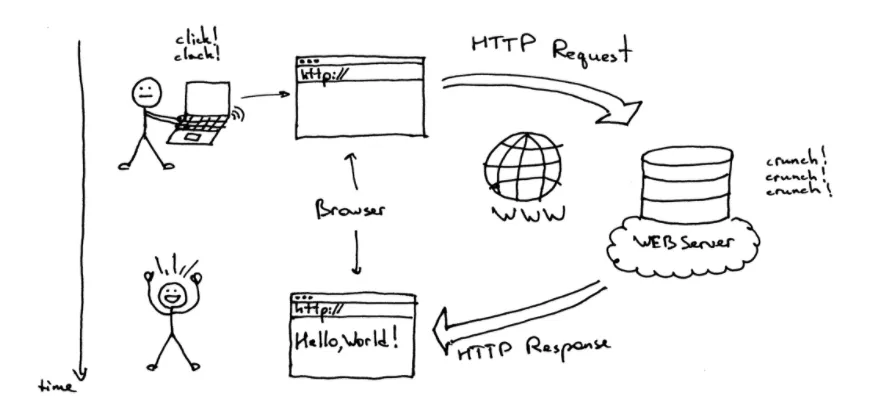
The server is a remote computer running the backend (databases, logins, business logic and all the stuff you don’t see).
The client is your device (the browser, handling what you see and interact with, like clicking a button or opening a menu).
In frameworks like React/Next.js, the split shows up as server components and client components. Server components run only on the server and never ship their code to the browser. Client components also render on the server first for a fast initial load, but their JavaScript then ships to the browser and “hydrates,” making them interactive.
Rule of thumb: if it needs state, interactivity, or browser APIs (useState, onClick), it’s client. If it just fetches or prepares data with no interactivity, it’s server.
Think of the server as the kitchen and the client as your table. You never see inside the kitchen, but without it, there’s no meal. If that makes sense.
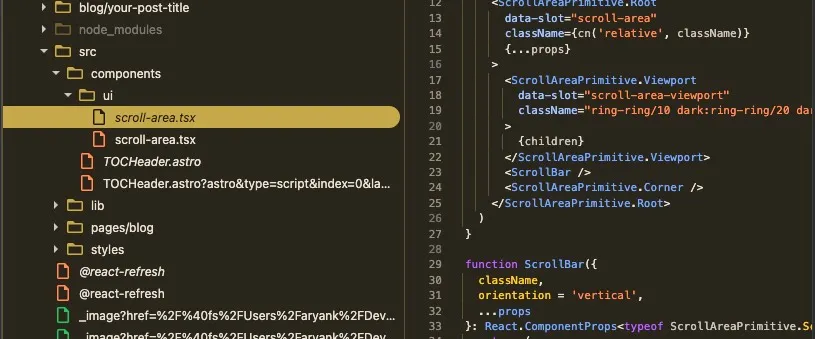
Server code stays on the server. Your database queries, your API keys, your business logic: none of it is downloaded to the browser. Client code is downloaded, meaning anyone can open dev tools and read it.
Here is a screenshot of the sources tab in the browser’s dev tools to show you what I am talking about:
Three ways to run server code
Now that you understand how websites work at a high level, there are three ways to run server-side code in NextJS.
1. Fetch data directly in a Server Component
This is the simplest option. Since Server Components can run async code, you can just await your data straight inside the component and no API layer is needed.
async function getPosts() { const res = await fetch('https://api.example.com/posts'); return res.json();}
export default async function PostsPage() { const posts = await getPosts();
return ( <ul> {posts.map((post: { id: string; title: string }) => ( <li key={post.id}>{post.title}</li> ))} </ul> );}📖 Official Docs: Getting Started: Fetching Data
2. Route Handlers
These are Next.js’s version of an API endpoint: a route.ts file that responds to HTTP methods like GET or POST. The important thing about a Route Handler is that it creates a public URL that anything on the internet can request.
import Stripe from 'stripe';
const stripe = new Stripe(process.env.STRIPE_SECRET_KEY!);
export async function POST(request: Request) { const signature = request.headers.get('stripe-signature'); if (!signature) { return new Response('Missing signature', { status: 400 }); }
const body = await request.text(); // raw body, for signature verification
const event = stripe.webhooks.constructEvent( body, signature, process.env.STRIPE_WEBHOOK_SECRET!, );
// handle the event
return new Response(null, { status: 200 });}They are also how you return something that isn’t a page, such as XML:
export async function GET() { const feed = await buildRssFeed();
return new Response(feed, { headers: { 'content-type': 'application/xml' }, });}📖 Official Docs: Getting Started: Route Handlers
3. Server Actions
Server Actions are async functions marked with 'use server' that you can call directly from a component, such as on a form submission, without writing a separate API route.
'use server';
import { auth } from '@/lib/auth';
export async function createPost(formData: FormData) { // Always check auth inside the action. More on why below. const session = await auth(); if (!session?.user) { throw new Error('Unauthorized'); }
const title = formData.get('title');
await createPostInDatabase({ title, authorId: session.user.id });}import { createPost } from '../actions';
export default function NewPostPage() { return ( <form action={createPost}> <input name="title" /> <button type="submit">Create Post</button> </form> );}That auth check on the first three lines is not optional decoration. I will explain exactly why in the security section.
📖 Official Docs: Getting Started: Mutating Data
When to use what?
The easiest way I have found to make this decision is:
- If you are reading data for a page, use a Server Component.
- If your own Next.js UI is changing data, use a Server Action.
- If something needs a public HTTP endpoint, use a Route Handler.
There are exceptions, but this should be your default.
Fetching data: use a Server Component
If a Server Component needs data, call your database, SDK, or backend function directly. Do not create a Route Handler just so your server can make a request back to itself.
That extra request adds another hop, makes errors harder to trace, and can break your build. A request to https://myapp.com/api/posts needs a running app at that address, but during next build, the version you are building is not running yet, so there is nothing to answer it.
If the page also needs interactivity, fetch the data in the Server Component and pass it to a Client Component:
// Server Componentexport default async function Page() { const posts = await getPosts(); return <PostFilter posts={posts} />; // PostFilter is 'use client'}The browser receives the data it needs without getting access to your database credentials or server-side code.
If the request is slow, you do not have to block the entire page while waiting for it. You can pass the promise itself and use Suspense:
// Server Componentimport { Suspense } from 'react';
export default function Page() { const posts = getPosts(); // no await
return ( <Suspense fallback={<Skeleton />}> <PostList postsPromise={posts} /> </Suspense> );}'use client';
import { use } from 'react';
export default function PostList({ postsPromise,}: { postsPromise: Promise<{ id: string; title: string }[]>;}) { const posts = use(postsPromise); // suspends until resolved
return ( <ul> {posts.map((post) => ( <li key={post.id}>{post.title}</li> ))} </ul> );}The user sees the page and loading state immediately, and the list appears when the promise resolves.
Changing data: use a Server Action
A mutation is anything that changes something: creating a row, deleting a record, sending an email, or starting a job. For mutations triggered by your own Next.js UI, Server Actions are usually the best fit.
Think of a Server Action as glue between a specific interaction and your backend. savePost(formData) can be designed around one form on one page without creating and maintaining a separate API endpoint.
There are three important properties to understand.
Server Actions use POST
Every Server Action invocation uses an HTTP POST. There is no GET version, which is one reason not to use actions for normal reads: you give up the caching behaviour that makes GET requests useful.
More importantly, a Server Action that your app actually uses is a reachable server entry point. Next.js compiles it into an endpoint, and the reference to it lives in the JavaScript your browser downloads. Hiding the button or form from logged-out users does not secure the action, because an attacker does not have to use your UI at all.
Authentication and authorization must happen inside the action.
Server Actions are dispatched sequentially
Next.js dispatches Server Actions one at a time per client. If the client triggers three separate actions, the second waits for the first and the third waits for the second.
// These do NOT run in parallel when each function is a Server Actionawait Promise.all([askClaude(question), askGPT(question), askGemini(question)]);This keeps the updated UI returned by each mutation consistent with the mutation that produced it. If you need parallel work, do it inside one action:
// Parallel work inside ONE action'use server';
export async function askAll(question: string) { const [claude, gpt, gemini] = await Promise.all([ askClaude(question), askGPT(question), askGemini(question), ]);
return { claude, gpt, gemini };}If the browser needs to start multiple independent requests, or stream responses as they arrive, use a Route Handler instead.
Server Actions can update data and UI together
This is the main benefit of a Server Action. Without one, saving a form often means sending a POST, waiting for it, fetching the updated data, and then updating the UI.
With a Server Action, you can mutate the data and revalidate the page together:
'use server';
import { revalidatePath } from 'next/cache';
export async function savePost(formData: FormData) { await savePostToDatabase(formData); revalidatePath('/posts'); return { ok: true };}Next.js sends the action result and the updated server-rendered UI back in the same response. You do not have to manually write “and now fetch the list again.”
Public endpoints: use a Route Handler
Here is the question I ask before creating a Route Handler:
Is the caller something other than my own Next.js UI, or do I need control over the HTTP response itself?
If the answer is yes, use a Route Handler.
Server Components and Server Actions live inside your app.
The caller is outside your Next.js app
Stripe, GitHub, a CMS, a mobile app, or another backend cannot call a Server Action as a stable API. They need a documented URL. That is the webhook example from earlier, and the same applies to OAuth callbacks, CLI tools, partner integrations, and any API that needs a contract you can version.
Scheduled services such as Vercel Cron also need a Route Handler, because they work by requesting a URL on a schedule.
You are returning something other than a page
Server Components produce React trees. If you need to return XML, JSON, CSV, a PDF, an image, or a special file such as llms.txt, use a Route Handler. The rss.xml example above is the pattern.
You need to stream a response
Server Actions are not designed for streaming raw responses. Route Handlers can return a ReadableStream, which makes them the right fit for streamed AI output, live logs, or any result that arrives in chunks:
export async function POST(request: Request) { const { question, model } = await request.json(); const stream = await callModelStreaming(question, model);
return new Response(stream, { headers: { 'content-type': 'text/event-stream' }, });}Because these are ordinary HTTP requests, the client can also make several of them at once, without the Server Action dispatch queue serialising them.
You are proxying another backend
Sometimes the browser needs data from another backend, but you do not want to expose that backend’s address or service credentials. A Route Handler can authenticate the user, validate the request, and then forward it:
import { auth } from '@/lib/auth';
export async function GET() { const session = await auth(); if (!session) return new Response(null, { status: 401 });
const response = await fetch(`${process.env.BACKEND_URL}/posts`, { headers: { authorization: `Bearer ${process.env.SERVICE_TOKEN}`, }, });
return Response.json(await response.json());}This is also useful when you need to combine multiple backend responses or reshape data before sending it to the client.
The read can only happen in the browser
Most reads should happen in Server Components, but some depend on browser-only information such as geolocation or local storage. Frequently polled data is another common example.
In those cases, use a client-side data library rather than a raw useEffect fetch. Libraries like SWR and React Query handle caching, deduplication, revalidation, and race conditions that hand-rolled useEffect code usually gets wrong:
'use client';
import useSWR from 'swr';
const fetcher = (url: string) => fetch(url).then((r) => r.json());
export default function LiveScores() { const { data, error, isLoading } = useSWR('/api/live-scores', fetcher, { refreshInterval: 5000, });
if (isLoading) return <p>Loading…</p>; if (error) return <p>Something went wrong.</p>;
return <ScoreBoard scores={data} />;}Cases that do not need a Route Handler
“My Server Component needs data.” Call the source directly. Going through your own endpoint adds a request and can fail during the build.
“I need to save this form.” Use a Server Action if the form belongs to your Next.js UI. It already handles the server call and can return updated UI after the mutation.
“The logic runs on the server.” That alone is not a reason to create an endpoint. A plain function imported by a Server Component already stays on the server. Creating a Route Handler makes the logic reachable through a URL, and that should be an intentional decision.
Seven mistakes that create real vulnerabilities
Everything above is architecture. This section is the part I actually want you to take away, because these are the issues I keep finding in apps built quickly.
The mindset that prevents all seven: assume every action and endpoint will be called by someone who never loaded your UI. Eventually, someone will.
Mistake 1: Hiding the UI instead of checking the user
This is the big one.
'use server';
export async function deleteUser(userId: string) { await db.user.delete({ where: { id: userId } });}The button being hidden is irrelevant. Next.js turned this function into a POST endpoint, and the reference to it is in the JavaScript your browser downloaded. Anyone can find it and call it directly. The same applies to a Route Handler at /api/admin/delete-user: no link pointing at a URL does not mean the URL does not exist.
'use server';
import { auth } from '@/lib/auth';
export async function deleteUser(userId: string) { const session = await auth(); if (!session?.user) throw new Error('Unauthorized'); if (session.user.role !== 'admin') throw new Error('Forbidden');
await db.user.delete({ where: { id: userId } });}Note that checking auth on the page that renders the form does not protect the action. They are separate requests. The check has to be in the action itself, every time.
Mistake 2: Trusting an ID that came from the browser
This one is subtle because the code looks completely reasonable, and it is probably the most common vulnerability in apps I look at.
'use server';
export async function updatePost(postId: string, content: string) { const session = await auth(); if (!session?.user) throw new Error('Unauthorized');
await db.post.update({ where: { id: postId }, data: { content } });}There is an auth check, so this feels safe. But postId came from the client, and nothing verifies that the post belongs to the person editing it. Change the ID in the request and you can edit any post in the database.
The fix is to make ownership part of the lookup:
'use server';
export async function updatePost(postId: string, content: string) { const session = await auth(); if (!session?.user) throw new Error('Unauthorized');
const post = await db.post.findFirst({ where: { id: postId, authorId: session.user.id }, }); if (!post) throw new Error('Not found');
await db.post.update({ where: { id: post.id }, data: { content } });}The same applies to dynamic routes. app/posts/[id]/edit/page.tsx receives whatever ID is in the URL:
const post = await db.post.findUnique({ where: { id } });
// ✅const post = await db.post.findFirst({ where: { id, authorId: session.user.id },});Two related habits worth building:
- Derive identity from the session, never from the request. If the browser sends you an
ownerIdor arole, ignore it and look it up server-side. - Validation is not authorization. A schema library like Zod checks that the input has the right shape. A perfectly valid
{ postId: "abc123" }can still point at someone else’s row.
Mistake 3: Sending whole database records to Client Components
Remember the point from the start of the post: your code is hidden, your data is not.
export default async function Page() { const user = await db.user.findUnique({ where: { id } }); return <Profile user={user} />; // Profile is 'use client'}This looks safe. There is no API route, nothing is in a NEXT_PUBLIC_ variable, and the database call happens on the server. But user has to travel to the browser for the client component to render it, and it arrives with every column: passwordHash, stripeCustomerId, resetToken, internal flags, all of it. Open the page source and it is right there.
Send only what the UI renders:
export default async function Page() { const user = await db.user.findUnique({ where: { id }, select: { id: true, name: true, avatarUrl: true }, });
return <Profile user={user} />;}The same rule applies to whatever a Server Action returns, since return values are serialised to the client too. Shape your data for the UI, not for your own convenience. If you want a safety net, React’s experimental taint APIs can make it an error to pass a tainted object across the boundary.
Mistake 4: Treating proxy.ts as your authentication layer
In Next.js 16, middleware.ts was renamed to proxy.ts. It runs before requests reach your routes, which makes it tempting to put your auth check there and consider the job done.
It is genuinely useful for broad redirects and cheap early rejection. It is not a sufficient security boundary. It can be bypassed in more situations than you would expect, it does not run for every kind of request, and it operates too far from your data to know whether this specific user may touch this specific row.
Use it as a first filter. Keep the real check as close to the data access or mutation as possible.
Mistake 5: Leaking secrets into the client bundle
- Never hardcode secrets in frontend code.
- Treat every
NEXT_PUBLIC_*environment variable as public. It is inlined into the JavaScript sent to the browser. If it is prefixed, it is published. - Use the
server-onlypackage for modules that must never be imported into client-side code. It turns a mistake into a build error instead of a leak.
A common pattern that bites people: an API key that starts life in a server file, then someone imports that file into a client component to reuse a helper function, and the key comes along for the ride. server-only catches exactly this.
Mistake 6: Returning internal errors to the client
catch (error) { return Response.json({ error: error.message }, { status: 500 });}Database errors, stack traces, and ORM messages tell an attacker about your table names, columns, and constraints. Log the real error server-side and return something generic:
catch (error) { console.error(error); return new Response('Internal error', { status: 500 });}Mistake 7: No rate limiting on expensive operations
Anything that costs you money or resources per call, such as an LLM request, an email send, an image generation, or a login attempt, needs a limit. Otherwise a single script can run up your bill or brute-force your login overnight.
Do this in code, and also enable whatever rate limiting your host offers.
Putting it together
A Route Handler with all of this applied:
import { auth } from '@/lib/auth';import { checkRateLimit } from '@/lib/rate-limit';import { schema } from './schema';
export async function POST(request: Request) { // 1. Authenticate — always. It's an open URL. const session = await auth(); if (!session) return new Response(null, { status: 401 });
// 2. Rate limit const { limited } = await checkRateLimit(request); if (limited) { return Response.json({ error: 'Too many requests' }, { status: 429 }); }
// 3. Validate the body — untrusted input const parsed = schema.safeParse(await request.json()); if (!parsed.success) { return Response.json({ error: 'Bad request' }, { status: 400 }); }
try { // 4. Authorize the specific operation inside doWork, // scoped to session.user.id — not just "is logged in" const result = await doWork(parsed.data, session.user.id); return Response.json(result); } catch (error) { // 5. Log the real error, return a safe one console.error(error); return new Response('Internal error', { status: 500 }); }}What Next.js gives you for free (and what it doesn’t)
Next.js adds some protections for Server Actions: origin checks to prevent CSRF, encrypted action IDs, a default 1MB request body limit, and removal of unused actions during builds.
These are useful, but none of them know who your users are or what they are allowed to do. They do not replace authentication, authorization, or validation in your own code.
Two deployment notes:
- If your app sits behind a proxy or CDN, configure
experimental.serverActions.allowedOriginsinnext.config.js, or legitimate requests will be rejected by the CSRF check. - If you self-host across multiple instances, they all need the same
NEXT_SERVER_ACTIONS_ENCRYPTION_KEY. Variables that an inline Server Action closes over are encrypted before being sent to the client, and every instance needs the same key to decrypt them.
Final Takeaway
Server Component for reads, Server Action for mutations from your own UI, and Route Handler when you need a public URL.
Then secure all three at the point where they touch data, and assume every one of them will be called by someone who never loaded your page.
If you are building with an AI agent, you can hand it the instructions file below so it follows these conventions by default:
# NextJS Coding Agent Guidelines
## This is NOT the Next.js you know
This version has breaking changes — APIs, conventions, and file structure may all differ from your training data. Read the relevant guide in `node_modules/next/dist/docs/` (resolved from this file's directory; in monorepos the `next` package may not be visible from the repo root) before writing any code. Heed deprecation notices.
This block is written and re-added by `next dev` — verify at `node_modules/next/dist/server/lib/generate-agent-files.js`. Removing it from a diff only re-creates the uncommitted change; committing it with your work keeps the tree clean.
## Non-negotiable data rules
These apply to **every** piece of code that reads or writes data, regardless of whether it lives in a Server Component, a Server Action, or a Route Handler. Later sections assume these and do not repeat them.
1. **Authenticate and authorize at the point of data access.** A check on the page that renders a form does not protect the action the form calls. A check in `proxy.ts` does not protect the route. The check belongs next to the query.2. **Scope every query by ownership, not just by ID.** An ID from a URL, a form field, or an action argument is attacker-controlled. Use `where: { id, ownerId: session.user.id }`, never `where: { id }` alone, for anything a user shouldn't see or edit universally.3. **Derive identity from the session.** If a request supplies an `ownerId`, `userId`, `role`, `tenantId`, or price, ignore it and look it up server-side.4. **Validation is not authorization.** Zod checks that input has the right _shape_. A perfectly valid `{ postId: "abc" }` can still point at someone else's row.5. **Return and pass only the fields the UI renders.** Anything crossing into a Client Component — as props or as a Server Action return value — is serialized into the RSC payload and readable in page source. Use `select:` / explicit DTOs. Never pass a raw ORM record.6. **Rate limit anything expensive.** LLM calls, email sends, image generation, auth attempts, file processing. This applies to Server Actions as much as Route Handlers.7. **Never return internal errors to the client.** Log the real error server-side; return a generic message and status. ORM errors leak schema.8. **Never cache session-dependent output.** See the caching section — this is the one mistake in this file that no auth check will catch.
## Client vs Server Components
- Everything is a Server Component by default. Do **not** put `"use server"` at the top of a regular server component — that directive is only for Server Functions.- Push `"use client"` as **low as possible** in the tree. When you need interactivity, extract a small leaf client component rather than converting a whole subtree.- The directive marks a **boundary**: anything imported below it is already in the client graph. Re-declaring `"use client"` in every descendant file is a team convention, not a framework requirement — do it for legibility if you like, but nothing breaks without it.- Server Components can be passed as `children`/props into Client Components and remain server components. Client/server is determined by **imports**, not nesting.- No React state or hooks (`useState`, `useEffect`, `useContext`, …) in Server Components.- Client Components render on both server (SSR) and client (hydration) — their logs appear in both terminal and browser console.- **Props crossing the boundary are public.** They are serialized into the RSC payload and visible in page source. Passing a whole user record leaks `passwordHash`, `stripeCustomerId`, and every other column even though the query ran on the server:
```tsx// ❌ every column ships to the browserconst user = await db.user.findUnique({ where: { id } });return <Profile user={user} />;
// ✅const user = await db.user.findUnique({ where: { id }, select: { id: true, name: true, avatarUrl: true },});return <Profile user={user} />;```
## Choosing where server code runs
Three tools, three jobs. Pick by **who calls it** and **whether it mutates**.
| Situation | Use || -------------------------------------------------------------------------------- | --------------------------------------------------------- || Reading data to render a page | Call the data function directly in a **Server Component** || Mutation triggered by your own UI (form submit, button click) | **Server Action** || Caller is not your React app (webhook, callback URL, mobile client, third party) | **Route Handler** || Non-HTML content type (JSON API, XML, RSS, files, images) | **Route Handler** || Proxying/aggregating an external or internal backend | **Route Handler** || Client-side read that genuinely cannot be server-rendered | **Route Handler** + SWR / React Query |
## Reads: fetch in Server Components, directly from the source
- Fetch with `fetch`, an ORM, or a database client directly inside an async Server Component. Credentials and query logic never reach the client bundle.- **Do NOT fetch from your own Route Handlers inside a Server Component.** - At build time (prerendered) this **fails the build** — no server is listening. - At request time it adds a needless HTTP round trip between the handler and the render process.- **Authorize reads.** A read is not automatically safe because it doesn't mutate. `app/posts/[id]/page.tsx` receives whatever ID is in the URL:
```ts// ❌ any logged-in user can read any postconst post = await db.post.findUnique({ where: { id } });
// ✅ scoped to the callerconst session = await auth();if (!session?.user) redirect('/login');
const post = await db.post.findFirst({ where: { id, authorId: session.user.id },});if (!post) notFound();```
- Pass results down to Client Components as props — selected fields only (see above).- To stream: do **not** await in the Server Component. Pass the promise as a prop and read it with React's `use()` inside a `<Suspense>` boundary.- Wrap shared data-fetching functions in `React.cache` so multiple components in one request share a result instead of refetching. Scope is a single request only.- Identical `fetch` calls in one React tree are memoized by default — fetch in the component that needs the data instead of prop-drilling.
## Mutations: Server Actions
Use a Server Action (`'use server'`) when **all** of these hold:
- It performs a mutation (create/update/delete) or a side effect (email, job dispatch).- It is UI-specific, not a general-purpose public API.- The caller is your own Next.js frontend.
Structural properties that drive the rule:
- Actions are **POST only** under the hood.- **The client dispatches actions one at a time.** Three actions fired in quick succession queue behind each other. `Promise.all` does **not** parallelize them. This is the main reason they are wrong for reads.- When an action revalidates, Next.js runs the action **and** re-renders the route in a single HTTP request. The response carries both the return value and a fresh RSC Payload. No follow-up fetch is needed to show the updated UI.
Do **not** create Server Actions whose purpose is a GET-only read. If you need parallel work, do it inside a single Server Action, or fetch in parallel from a Server Component, or use a Route Handler.
Shape of a correct action — auth, ownership-scoped lookup, mutation, revalidation:
```ts'use server';
import { auth } from '@/lib/auth';import { updateTag } from 'next/cache';
export async function updatePost(postId: string, content: string) { const session = await auth(); if (!session?.user) throw new Error('Unauthorized');
const post = await db.post.findFirst({ where: { id: postId, authorId: session.user.id }, }); if (!post) throw new Error('Not found');
await db.post.update({ where: { id: post.id }, data: { content } }); updateTag(`post-${post.id}`);
return { ok: true };}```
Calling them:
- From Server Components directly, or from `<form action={...}>` / `<button formAction={...}>`.- From Client Components via `useActionState`, `useTransition`, or an event handler wrapped in `startTransition`.- Server Functions cannot be _defined_ in Client Components — define them in a `'use server'` file and import.
Destructive operations (deletes, permission changes, payment actions) may warrant an elevated session check or re-authentication, and should fail loudly rather than silently no-op.
## Route Handlers
- Live in `app/api/.../route.ts`. They are **public HTTP endpoints** — anyone can call them.- Apply all eight non-negotiable rules above. Auth first, then rate limit, then validate, then authorize the specific operation.- Use `try/catch` and never leak internal detail in error messages.- Validate content type and size; treat all input as untrusted.- `NextRequest` gives `nextUrl` (parsed pathname/searchParams) and cookie helpers; `NextResponse` gives `json()`, `redirect()`, `rewrite()`.- If `OPTIONS` is undefined, Next.js generates it and sets `Allow` from the other exported methods.
### CORS
- **Never set `Access-Control-Allow-Origin: '*'` on a handler that returns user-specific or authenticated data.** This is the reflexive fix for a CORS error and it makes the endpoint readable by any site the user visits.- If cross-origin access is genuinely needed, allowlist specific origins and echo only matching ones. `*` is incompatible with credentials anyway.- A CORS error on a same-origin call usually means the URL is wrong, not that CORS needs loosening.
### Skeleton
```tsimport { auth } from '@/lib/auth';import { checkRateLimit } from '@/lib/rate-limit';import { schema } from './schema';
export async function POST(request: Request) { const session = await auth(); if (!session) return new Response(null, { status: 401 });
const { limited } = await checkRateLimit(request); if (limited) { return Response.json({ error: 'Too many requests' }, { status: 429 }); }
const parsed = schema.safeParse(await request.json()); if (!parsed.success) { return Response.json({ error: 'Bad request' }, { status: 400 }); }
try { // doWork authorizes against session.user.id — not just "is logged in" const result = await doWork(parsed.data, session.user.id); return Response.json(result); } catch (error) { console.error(error); return new Response('Internal error', { status: 500 }); }}```
## Caching and revalidation
**`fetch` is NOT cached by default** (changed in Next 15). Uncached fetches block rendering until they resolve.
- To cache, use the `use cache` directive.- To avoid blocking, wrap the fetching component in `<Suspense>` and stream at request time.
### Never cache session-dependent output
This is the most dangerous mistake in this file, because no authentication check will catch it. If a cached route or function renders anything derived from the current user, the first user's data gets served to everyone who hits the cache afterwards. The auth check passed — for someone else.
```ts// ❌ one user's dashboard, served to all of them'use cache'export async function Dashboard() { const session = await auth() return <Orders orders={await getOrders(session.user.id)} />}```
Before adding `use cache`, a `revalidate` value, or any cache wrapper, ask: **is this output identical for every visitor?**
- **Safe to cache:** marketing pages, public blog posts, product catalogues, docs, static reference data.- **Never cache:** anything reading `cookies()`, `headers()`, or a session; anything keyed to a user, tenant, or org; anything behind a login.- If a page mixes both, cache the shared parts and put the personalized parts behind their own `<Suspense>` boundary so they render per-request.
### Choosing a revalidation API
After a mutation, pick by what needs to change:
| API | Behaviour | Use when || ---------------- | -------------------------------------------------------------------------------------------------------------------------------- | --------------------------------------------- || `updateTag` | Immediate expiry. The re-render shipped in the action response **waits** for fresh data. Server Actions only. | The user must see their own write immediately || `revalidateTag` | Stale-while-revalidate. Next reads get the stale value; refresh happens in background. The action's re-render does **not** wait. | Background freshness is fine || `revalidatePath` | Invalidate by URL path | One route affected, tagging is overkill || `refresh` | Refetch the current route's RSC Payload without invalidating cached data. Server Actions only. | View depends on state outside the cache |
Notes:
- Default to `updateTag` for read-your-own-writes. Reaching for `revalidateTag` there is a common bug — the user won't see their change.- None of these throw. `redirect` **does** throw a control-flow exception, so nothing after it runs — call revalidation _before_ `redirect`.- Avoid waterfalls: start independent requests then `await Promise.all([...])`. Use `Promise.allSettled` if one failure shouldn't fail everything.
## Framework-level security (and its limits)
Next.js provides these automatically for Server Actions. **None of them know who your users are or what they may do.** They do not replace the non-negotiable rules above.
- CSRF: `Origin` compared against `Host` / `X-Forwarded-Host`. Configure `experimental.serverActions.allowedOrigins` in `next.config.js` for proxy/CDN domains.- 1MB default body limit — configure `experimental.serverActions.bodySizeLimit` if needed.- Encrypted action IDs; unused Server Functions stripped from client bundles.- Inline-action closure variables are encrypted. Self-hosted/multi-instance: set a stable `NEXT_SERVER_ACTIONS_ENCRYPTION_KEY` across instances.
### `proxy.ts` (renamed from `middleware.ts` in Next 16)
- Only one per project; use `config.matcher` to scope it.- Good for coarse redirects and early rejection.- **Not a security boundary.** It runs too far from your data to know whether _this_ user may touch _this_ row, and it has historically been bypassable (see CVE-2025-29927). Auth still gets checked at the data access point, every time.
### Secrets
- Never hardcode secrets in frontend code.- Treat every `NEXT_PUBLIC_*` value as public — it is inlined into the browser bundle. If it is prefixed, it is published.- Use the `server-only` package for modules that must never be bundled client-side. It converts an accidental client import into a build error instead of a leak.
## Browser APIs
- Guard browser-only APIs: check `typeof window !== "undefined"` before `window`/`document`.- Put browser-only code in `useEffect` inside a Client Component.- `dynamic(..., { ssr: false })` is only allowed **inside a Client Component** in the App Router. It will error in a Server Component.
## Rendering, hydration, streaming
- Avoid hydration mismatches: server-rendered HTML must match first client render. No `Date.now()` / `Math.random()` in initial render output without guards.- Prefer **granular `<Suspense>`** over route-level `loading.tsx`. - Place `<Suspense>` **above** the async component, not inside it. - Use `key` on a boundary when it should re-suspend on dependency change.- `loading.tsx` caveat: if a **layout** reads uncached or runtime data (`cookies()`, `headers()`, an uncached fetch), it will **not** fall back to a same-segment `loading.tsx` — it blocks navigation until the layout finishes. Wrap that access in its own `<Suspense>`, or move the fetch into `page.tsx`.- Design meaningful loading states (skeletons matching the real layout), not bare spinners.
## Routing and params
- `params` and `searchParams` are **Promises** — `await` them.- Reading `searchParams`, `cookies()`, or `headers()` in a Server Component makes that route dynamic. That is often correct; just be deliberate about it.- Treat everything in `params` and `searchParams` as attacker-controlled. See non-negotiable rule 2.- For simple query-string reads on the client, `useSearchParams()` in a Client Component avoids server-side dynamic rendering. It requires a `<Suspense>` boundary when the route is statically rendered.- Type Route Handler context with the generated `RouteContext<'/path/[id]'>` helper.
## Client-side fetching
Server Components cover most needs. Fetch on the client only for:
- Data depending on client-only Web APIs (geolocation, storage, audio, file).- Frequently polled data.
Use SWR or React Query for these — **not** Server Actions, which are dispatched sequentially, and not hand-rolled `useEffect` fetches, which get caching and race conditions wrong.